
Updated October 2026 · Reviewed by Billy Forte
If you are asking how long is impact texas drivers for adults, Texas DPS lists the Impact Texas Adult Drivers (ITAD) program as a 1-hour video. The video comes in three modules, and DPS says you do not have to watch them all in one sitting. Plan for a little extra time to sign up and print, and use a desktop or laptop, since the video does not play on phones or tablets.
Key Facts
- Video length: 1 hour, per the DPS Impact Texas Drivers page. See the length.
- Parts: three modules you can view on their own, but each must be finished before the next. See splitting it up.
- Equipment: a desktop or laptop with Google Chrome or Mozilla Firefox. See device and browser.
- Cost: none. DPS offers ITAD free of charge. See the extra minutes.
- Shelf life: the certificate is valid for 90 days, so timing matters as much as length. See the 90-day window.
How Long Is Impact Texas Drivers for Adults?
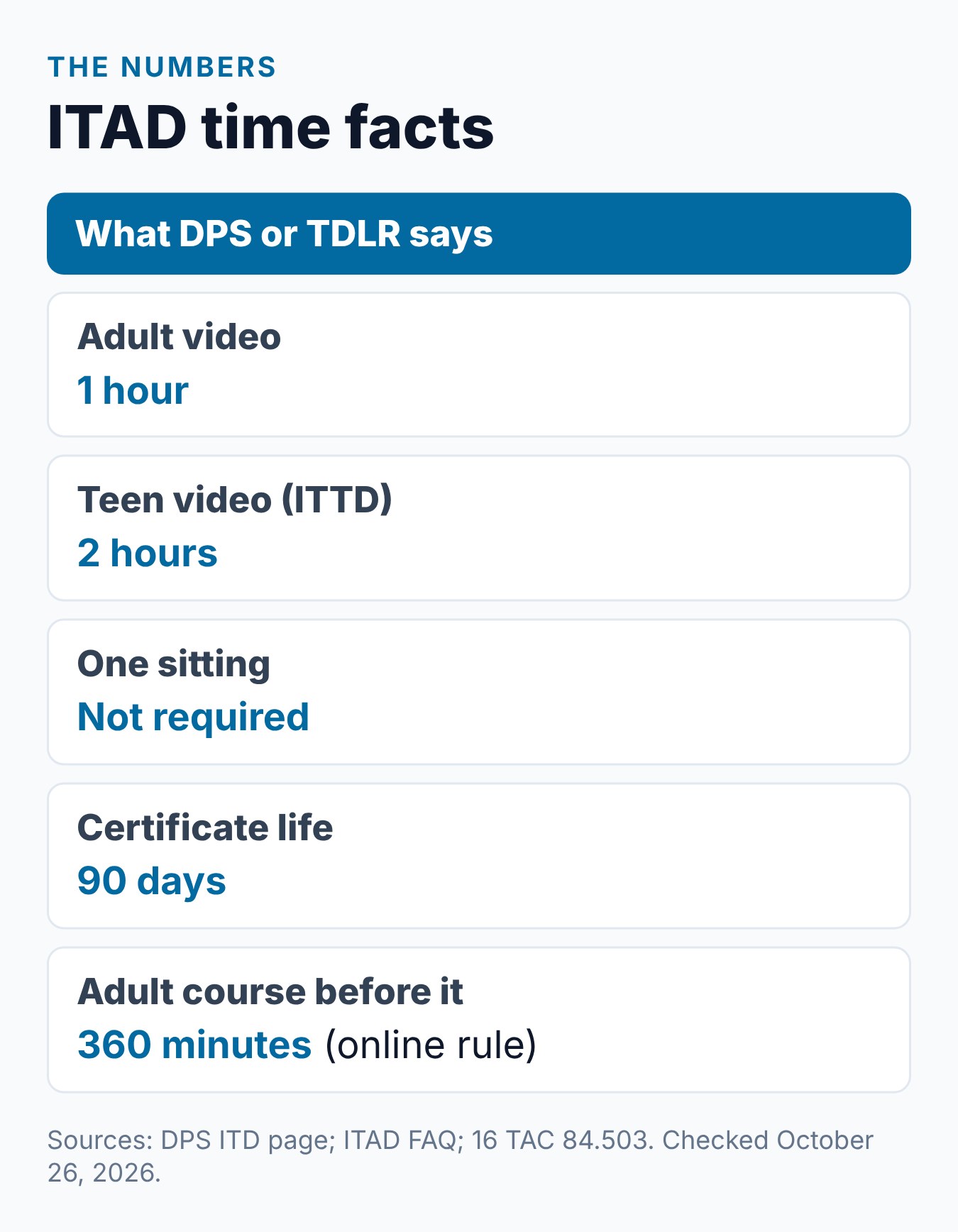
The DPS Impact Texas Drivers (ITD) page gives the length in plain terms. It calls ITAD a “1-hour video.” DPS names two groups who take it: drivers 18 to 24 who must take an adult driver education course, and drivers 25 or older.
The teen version is longer. DPS lists Impact Texas Teen Drivers (ITTD) as a 2-hour video for ages 15 to 17 in a parent-taught or minor driver education course. Under DPS rule 37 TAC 15.62, applicants 18 or older may pick either program.
That one hour is the whole program. DPS does not list any other class time for ITAD. The ITAD FAQ also says it “is a separate requirement” from the six hours of adult driver education.
Why the Length Is Fixed
ITAD is a video, so its length is set by DPS, not by you. The ITAD FAQ says “Each module must be completed in its entirety in order to progress to the next module.” So you cannot finish faster by jumping ahead.
The ITD site also warns about one error. If a message says you are skipping through the video, the Impact Texas Drivers portal says to set your computer’s clock to the current date and time.
It also says to close programs running in the background. Plan a few minutes for these checks before you press play.
Splitting the Hour Into Modules
You do not need one free hour in a row. The FAQ says the video “is broken up into three (3) modules that you can view independently.” That means you can watch one module, stop, and come back later for the next one.
DPS does not publish how many minutes each module runs. It also does not say whether you can pause in the middle of a module and resume at that spot. The safe plan is to start a module only when you can finish it.
Here are three ways to fit the hour into your week, using only the FAQ rule:
- One sitting. Watch all three modules back to back.
- Two sittings. Watch one module, then the last two on another day.
- Three sittings. Watch one module per session, in order.
A Sample Three-Session Plan
This plan uses only the FAQ rules. It assumes you start each module only when you have time to finish it.
- Session one. Register, enter the login code and watch module 1.
- Session two. Log back in and watch module 2 from start to end.
- Session three. Watch module 3, then print the certificate.
The FAQ ties the 90 days to the certificate, which you get after module 3. So the date that matters is the day you finish, not the day you start.
For how the module order works in detail, see our guide to the three ITAD modules and when to watch.
Time Beyond the Video
The 1-hour figure covers the video. A few small tasks sit around it. DPS does not give a time for any of them, so we list them without minutes:
- Sign-up. The ITAD register page asks for your email, a password, your name, date of birth and ZIP code, plus driver education details.
- Login code. The site prompts for an authorization code. It comes by email from “CRIME RECORDS,” so check spam if it is slow.
- Printing. You must print the certificate on paper before your driving test. A copy is emailed to you, and you can log in later to print it.
There is no fee step to plan for. The FAQ says “ITAD is offered by the Department free of charge.”
Our step-by-step ITAD guide walks through each screen in order.
Device and Browser Planning
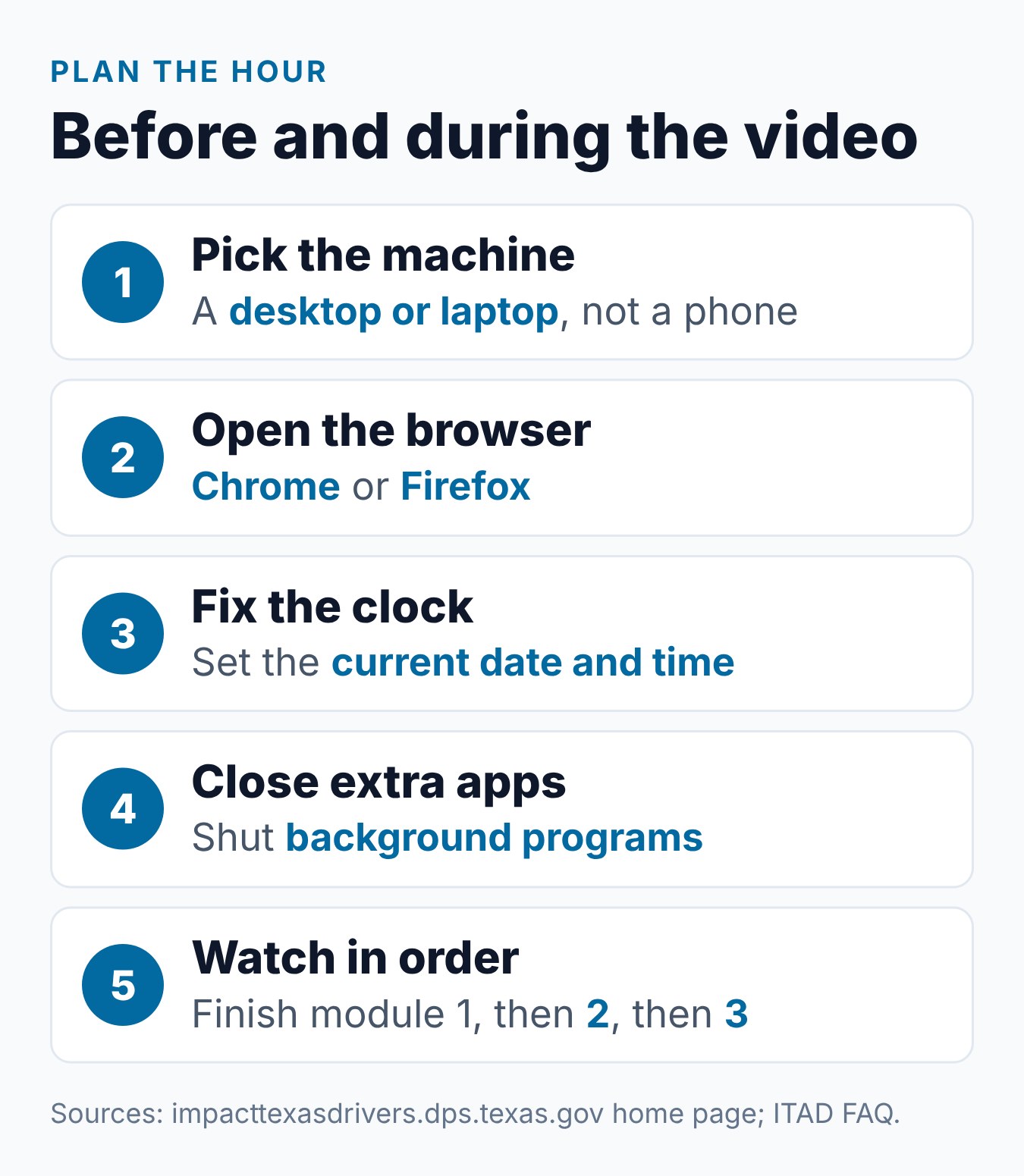
The right equipment saves time. The ITD portal says “a DESKTOP COMPUTER or a LAPTOP is needed.” It adds that the video “is not compatible with a CELL PHONE, TABLET, or IPAD.”
The portal also names two browsers: Google Chrome and Mozilla Firefox. Use one of them from the start. Switching devices halfway through only adds time.
Before you sit down, check these items:
- Computer. A desktop or laptop, not a phone or tablet.
- Browser. Chrome or Firefox, updated and ready.
- Clock. Your computer’s date and time set correctly.
- Background apps. Closed, as the portal suggests.
- Email. Open in another tab for the login code.
- Printer. Ready for the certificate, or a plan to print soon after.
What Can Stretch the Hour
The video length does not change, but a few things can add time around it. Each one below comes from the ITD portal, the ITAD course overview, the ITAD sign-up page or the FAQ:
- A slow login code. The code email comes from “CRIME RECORDS” and may land in spam or junk mail.
- A skipping error. A wrong computer clock or busy background programs can trigger it.
- The wrong device. A phone, tablet or iPad will not play the video, so you would have to start over on a computer.
- A name mix-up. The sign-up page says the certificate “will only print for the name registered on the account.”
- A missed test window. If you do not pass the driving test within 90 days, the FAQ says you restart ITAD.
The last item costs the most time. A restart means watching the full hour again.
If You Pick the Teen Video Instead
Adults 18 and older may take Impact Texas Teen Drivers instead of ITAD under rule 15.62. That choice doubles the video time. DPS lists ITTD as a 2-hour video.
The ITTD FAQ says the teen video is split into eight modules. Like ITAD, each one must be finished before the next. Our guide to ITTD vs ITAD compares the two side by side.
The 90-Day Window
Length is only half the planning. The DPS ITD page says, “The certificate is valid for 90 days.” The ITAD FAQ says to take ITAD “no more than 90 days prior to” the skills exam.
Rule 37 TAC 15.62 says the same thing another way. Proof of completion must reach the testing entity before the skills exam and “no later than ninety (90) days after program completion.”
Here is a simple count. If you finish ITAD on June 1, then 90 days later is August 30.
Your driving test should fall inside that span. If you do not pass the driving test in time, the FAQ says you “must restart the ITAD program.”
So the hour is easy. The timing takes more thought. Book your driving test date first, then fit the hour in close to it.
Where the Hour Fits in Your License Timeline
ITAD is short next to the adult course. Under TDLR rule 16 TAC 84.503, the online adult driver education course is 360 minutes, with at least 330 minutes of instruction. ITAD adds one more hour on top of that.
DPS says ITAD should come after the six-hour adult course. Applicants 25 and older have no driver education requirement, so for them the hour stands alone before the driving test.
DPS appointments can be booked up to six months ahead, according to the DPS appointments page. The DPS road test FAQ says road tests can be scheduled up to 180 days ahead.
That lets you pick a test date first. You can then watch ITAD within 90 days of that date.
See our full guide on how long it takes to get a Texas license for each stage.
What We Checked on the Official Pages
On the DPS and ITD pages we checked on October 26, 2026, the length was stated in only one place. The DPS ITD page called ITAD a “1-hour video.” The ITAD FAQ did not give minutes, but it answered one timing question directly.
That question asked whether the 1-hour video must be watched in one sitting. The FAQ’s answer pointed to the three modules you can view independently. No page we read listed a per-module length, a daily limit or a quiz that adds time.
Common Mistakes to Avoid
Each item comes from a DPS page or rule:
- Starting on a phone. The portal says the video does not work on a cell phone, tablet or iPad.
- Using another browser. The portal names Chrome and Firefox.
- Ignoring a wrong clock. A skipping error can come from your computer’s date and time.
- Watching too early. The certificate lasts 90 days, so an early start can force a restart.
- Leaving a module half done. Each module must be finished before the next one opens.
- Counting ITAD as course time. The FAQ says ITAD is separate from the six-hour course.
How Requirements Can Vary
Texas driver license rules come from state law, Texas DPS rules and TDLR rules, and they apply statewide. What you need still depends on your age, whether you hold a license from another state, and which tests you have already passed.
Laws, fees and office procedures can change. Check the Texas DPS and TDLR websites for current rules before you book an appointment or enroll in a course.
Frequently Asked Questions
How long is the Impact Texas Adult Drivers video?
DPS lists it as a 1-hour video. It is split into three modules. DPS does not publish the length of each module.
Do I have to watch ITAD in one sitting?
No. The ITAD FAQ says you can view the three modules independently. Each module must still be finished before you move to the next one.
Is the teen video shorter or longer?
Longer. DPS lists Impact Texas Teen Drivers as a 2-hour video. Adults 18 and older may choose either program, but ITAD is the 1-hour option.
Does ITAD count toward the six-hour adult course?
No. The ITAD FAQ calls it a separate requirement. You finish the six-hour course and ITAD as two different steps.
Can I watch ITAD on my phone to save time?
No. The ITD portal says you need a desktop or laptop computer. It says the video is not compatible with a cell phone, tablet or iPad.
Does a quiz add time at the end?
DPS pages describe ITAD as a video and do not mention a quiz. See our guide to ITAD questions and what to expect for what DPS does say.
Does ITAD cost anything?
No. The ITAD FAQ says DPS offers it free of charge. Your only costs are your own time, a computer and a way to print.
How soon before my driving test should I watch it?
Within 90 days of the test. The FAQ says to take ITAD no more than 90 days before the skills exam, and the certificate is valid for 90 days.
Conclusion
ITAD takes one hour of video, split into three modules you can spread across sessions. Use a desktop or laptop with Chrome or Firefox, and set aside a little time to sign up and print.
Time it so your driving test falls within 90 days. If you are 18 to 24 and still need the six-hour course first, see Driving Logic’s online Texas adult driver education course.
Related Articles
- What Is Impact Texas Adult Drivers (ITAD)? The Complete Guide
- ITAD Video: How the 3 Modules Work and When to Watch
- Impact Texas Drivers Video: How to Complete ITAD
- How Long Does It Take to Get Your First Texas Driver’s License?
Sources
- Texas DPS — Impact Texas Drivers (ITD) Program
- Texas DPS — Impact Texas Adult Drivers FAQ
- Texas DPS — Impact Texas Drivers website
- Texas DPS — Impact Texas Adult Drivers Course Overview
- 37 Tex. Admin. Code § 15.62 — Impact Texas Drivers program
- 16 Tex. Admin. Code § 84.503 — Adult driver education (online)
- Texas DPS — Driver License Services Appointments
- Texas DPS — FAQ: Scheduling a Road Test
Billy Forte is the owner of Driving Logic, a state-approved driver improvement course provider serving Texas and other U.S. states.
This article is general information, not legal advice. Texas driver license and driver education rules are set by Texas law, Texas DPS and TDLR, and they can change. Check the official DPS and TDLR websites for current requirements before you apply.